360° Video Vehicle Inspection: How Continuous Capture Documents Vehicle Condition
Learn why 360 degree video capture solution is better for car damage detection and how Inspektlabs' app ensures users get quality evidence for car damage detection.
A 360° video vehicle inspection is a guided continuous video walkaround that captures the vehicle from all sides and records required exterior, interior, and identification details in a single inspection flow. It captures every panel, angle, and required identifier in one pass, without gaps between shots.
This article covers the capture method itself: what a complete walkaround needs to include, whether special hardware is required, how live remote inspection works, and how capture quality is guided and validated. It explains how vehicle data is captured, not how damage is subsequently analysed.
How Inspektlabs Approaches 360° Vehicle Video Capture
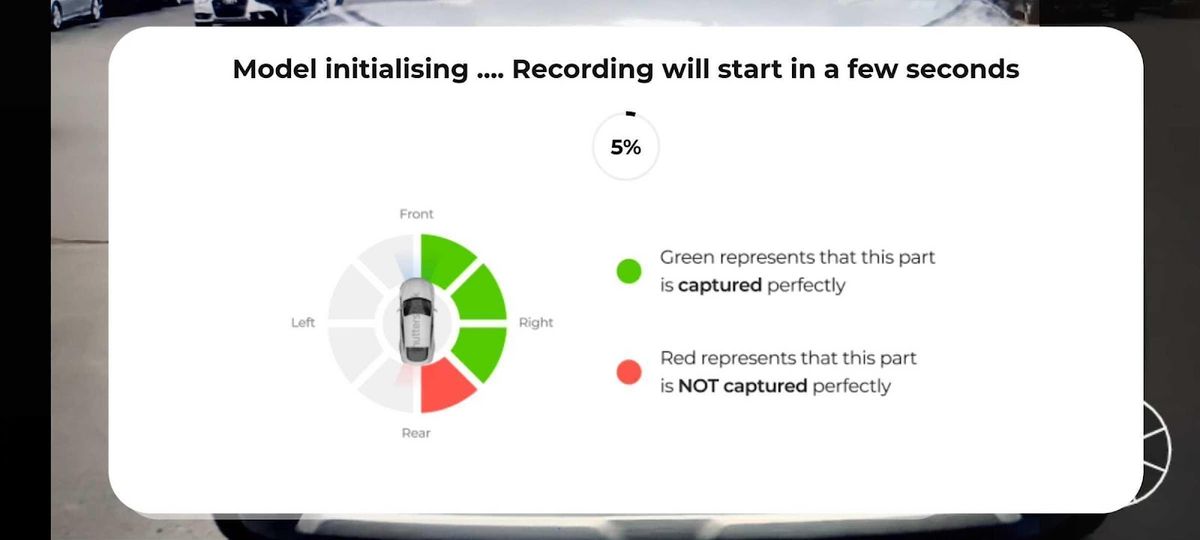
Inspektlabs uses guided smartphone video to standardize vehicle capture across different inspection environments. The capture flow guides users through the vehicle, checks coverage and recording conditions, and prompts them when required elements are missing or need to be recaptured.
This approach is designed for distributed inspections where installing dedicated camera equipment at every location is impractical. It can support inspections performed by field staff, rental operators, fleet teams, or customers using their own smartphones.
Why Does Continuous Video Capture Beat Static Photos for Vehicle Documentation?
Static photos create documentation gaps. A set of individual photographs captures whatever the person chose to photograph, from whatever angles they selected. Any panel, corner, or component not deliberately included is simply absent from the record. A standard photo set does not necessarily show whether an unpictured area was inspected or simply omitted from the capture.
Continuous video removes that ambiguity. A single unbroken recording that circles the vehicle documents every surface the camera passes over. Completeness is inherent to the method rather than dependent on the operator remembering every required angle.
Capture time is also significantly shorter. Taking 8 to 10 individual photographs of a vehicle takes around 2 minutes. A continuous 360 degree video walkaround takes 30 to 45 seconds and covers more surface area.
Continuity also matters for record integrity. A photo set consists of separate files that could have been taken at different times, in different places, or of different vehicles. A single continuous recording establishes that everything documented was present in one location at one time. Any break in the recording, any moment where the vehicle leaves the frame, is visible in the file itself.
The captured video is what feeds downstream analysis. For how the resulting media is processed, see AI-powered damage detection.
Photo & Video Capture
Capture perfect 360° vehicle inspections every time
Guide users with real-time AI prompts to improve video quality and reduce inspection rejections.
What Does a Complete 360 Degree Vehicle Walkaround Need to Cover?
A complete walkaround has two components: full exterior and interior coverage, and a set of specific required identifiers. Both are needed for the record to be accepted by insurers, rental operators, auction houses, and workshops.
Capture order
Recording in a consistent sequence produces a more usable record and reduces the chance of missing a zone.
- Start at the front of the vehicle and capture the full front view.
- Move along the driver side, covering the full side profile including all doors and panels.
- Capture the rear of the vehicle.
- Continue along the passenger side back to the starting point.
- Capture the interior, including the dashboard and seating areas.
- Capture the required identifier elements listed below.
☑ All exterior body panels: bonnet, roof, boot, doors, wings, and bumpers
☑ All four corners of the vehicle, captured at an angle rather than straight on
☑ All glass: windscreen, rear window, side windows, and sunroof where fittedAll four wheels and rims
☑ All lighting assemblies: headlights, indicators, tail lights, and fog lights
☑ Both side mirrors
☑ All four wheels and rims
☑ Interior: dashboard, front seats, rear seats, and boot space
If any of these identifier elements is missing, the inspection record is typically rejected and the user is asked to resubmit. Insurance companies, rental operators, auction houses, and authorised workshops all require these elements for verification purposes.
Do You Need Special Hardware for 360 Degree Video Capture?
No. A standard smartphone camera is sufficient.
This is a meaningful operational distinction. Two different approaches exist for capturing complete vehicle documentation, and they carry very different cost and deployment implications.
Fixed camera rigs can work well in controlled, high-volume facilities. Smartphone capture is more flexible for distributed fleets, field inspections, remote inspections, and customer-led capture. Inspektlabs operates on the smartphone model. No hardware purchase, no installation, and no site-by-site rollout is required.
Can Video Inspections Be Done Live and Remotely?
Yes. A live video walkthrough allows a remote party to observe the inspection as it happens, rather than reviewing a submitted recording afterwards.
In a live session, the person with the vehicle streams the walkaround from their smartphone. A remote reviewer, an insurer, a buyer, or a fleet manager, watches in real time. Guided prompts appear on the capturer's screen throughout, directing them to specific angles or areas that need coverage. The remote party can request a closer view of a specific panel while the session is still running.
Use case 1: Private seller to buyer or insurer
A private seller listing a used vehicle streams a complete walkaround for a remote buyer. The buyer sees the vehicle in real time and can ask for a closer look at any area during the session. This addresses the core trust problem in remote vehicle transactions: the buyer is not relying on a curated photo set chosen by the seller.
The same applies to a pre-policy insurance inspection. The policyholder streams the walkaround from their location. The insurer receives complete documentation without dispatching a field surveyor.
Use case 2: Rental return with remote verification
A rental vehicle is returned to a location without a permanently staffed inspection point. The returning renter or a local agent streams the walkaround. A remote verification team confirms the vehicle condition in real time, before the renter leaves the location.
A live session gives the remote reviewer visibility into the inspection as it happens, rather than relying only on files submitted afterward.
For claims specifically, live capture supports faster intake at the point of loss. See FNOL automation for how first-notice-of-loss workflows use this capture layer.
How Is Video Capture Guided and Validated?
The quality controls below operate on the capture itself, prompting the user in real time while they record. Their purpose is to ensure the resulting media meets the required standard before it is submitted.
Coverage tracking
A vehicle parked in a tight space, such as a narrow garage or a confined parking bay, restricts how the user can move around it. Without guidance, this results in incomplete coverage that is only discovered later during review.
Real-time coverage tracking identifies which regions of the vehicle have been captured properly, which need to be recaptured, and which are still outstanding. The user corrects the gap during the recording rather than after submission. Without this, a rejected video means the user has to return to the vehicle and start again, and the reason for rejection may not be clear to them.
Distance guidance
Recording too close to the vehicle makes it difficult to identify which part of the vehicle is in frame. The recommended recording distance is 3 feet from the vehicle, with zoom-in reserved for specific areas that require closer documentation.
Judging that distance consistently while walking and recording is not straightforward. Distance guidance analyses the user's position relative to the vehicle throughout the recording. If the user moves too close or zooms in unnecessarily, an on-screen prompt directs them to move back or zoom out.
Required element prompts
The app provides a wireframe guide that directs the user to include the chassis number, license plate, odometer, documents, and interior zones as part of the recording. A separate capture option is also available for each specific element individually.
This removes the most common cause of inspection rejection: a complete and well-shot video that is missing one required identifier.
Continuity checks
A valid record requires the vehicle to remain in frame throughout the recording. If the camera moves away from the vehicle, or the lens is covered mid-recording, an on-screen prompt appears directing the user to point the camera back at the vehicle. If the prompt is not followed, the recording is rejected or restarted.
This ensures the submitted file is a single continuous record of one vehicle, which is the property that makes video capture more reliable than a photo set.
Lighting validation
Low light removes the surface contrast needed to distinguish vehicle detail. Recording at night or in a dim garage produces a file where much of the vehicle is not clearly visible.
Lighting validation recognises when a recording is being made in insufficient light and displays a prompt advising the user to improve the lighting conditions. Where appropriate, the app suggests using the smartphone flashlight.
Focus and stability checks
Blurred frames make a recording unusable. A user cannot reliably monitor their smartphone screen and their physical surroundings at the same time while walking around a vehicle, so out-of-focus frames often go unnoticed during capture.
A blurriness index is assessed for each frame during recording. The app prompts the user when the camera goes out of focus or when movement is likely to cause blur. Device sensors are also used to confirm the recording is being made with steady movement.
For the underlying technology behind these capture controls, see core AI inspection technology.
Where Is 360 Degree Video Capture Used?
Insurance Inspections
Insurers use 360 degree video capture for pre-policy documentation and for claims evidence at the point of loss.
For pre-policy inspection, video capture establishes the vehicle's complete condition before cover begins. A photo set can omit a damaged panel, whether by oversight or intent. A continuous walkaround covers every surface the camera passes, making omission far harder.
For claims, the continuity of a single recording is what makes it stronger evidence than a photo set. Separate photo files could have been taken at different times or of different vehicles. A continuous recording documents one vehicle at one moment.
See: how AI claims technology is changing this process.
Rental Check-In and Check-Out
Rental operators can use video capture at both handover points. The value is consistency across locations and staff.
A photo-based process depends on each agent photographing the same angles in the same way. A guided video walkaround can standardize the capture sequence regardless of who is holding the phone.
Inspektlabs has applied this approach in a real rental environment with HolidayCars.
Real-World Example: HolidayCars' Remote Vehicle Inspections
A real-world example of smartphone-based vehicle capture is Inspektlabs' work with HolidayCars, a car rental aggregator operating with rental providers worldwide.
HolidayCars wanted to make vehicle condition documentation easier for customers who were required to document their rental vehicle themselves. Inspektlabs integrated a remote inspection workflow that allowed customers to complete the inspection using their smartphones.
The process guides the customer through a 360° vehicle capture using a web app. The inspection can record vehicle details such as the odometer and fuel level, while the captured media is processed to generate a vehicle condition report.
The case study reports more than 30,000 inspections processed, along with a 95% reduction in turnaround time and a 30% reduction in customer complaints following implementation.
This example demonstrates how continuous smartphone-based capture can work in a distributed rental environment, where customers may complete inspections without an inspector being physically present.
Read the full HolidayCars case study →
Vehicle Remarketing and Auctions
Auction platforms and remarketing operations use video capture to give remote buyers complete visibility of a vehicle.
A buyer reviewing a photo listing is seeing the angles the seller chose to include. A buyer reviewing a continuous walkaround sees every surface the camera passed, including areas a seller might not have chosen to photograph. That completeness is what supports buyer confidence in a remote transaction, and it reduces post-sale disputes about undisclosed condition.
Key Takeaways
- 360° video vehicle inspection captures a vehicle continuously in a guided walkaround.
- It focuses on complete vehicle documentation, while damage analysis is a separate process.
- Continuous video provides more consistent coverage than individually selected photos.
- A complete capture covers exterior, interior, wheels, identifiers, VIN, license plate, and odometer.
- No special hardware is required. A smartphone can be used for guided capture.
- Live video inspections enable remote teams to observe and guide vehicle inspections in real time.
The quality of any vehicle inspection record depends on how completely the vehicle was captured. Static photos produce gaps that are invisible in the record itself, because a missing angle looks identical to an angle that was checked and found clean.
Continuous 360 degree video capture addresses this at the source. One unbroken recording, guided in real time to maintain correct distance, focus, lighting, and coverage, produces a complete and verifiable record of the vehicle. It takes 30 to 45 seconds, requires no hardware beyond a smartphone, and can be conducted live from any location.
Frequently Asked Questions
What is a 360 degree vehicle inspection?
A 360 degree vehicle inspection is a continuous video walkaround that captures the complete exterior and interior of a vehicle in one unbroken recording. It documents every panel, angle, and required identifier in a single pass, typically taking 30 to 45 seconds.
Why is video better than photos for vehicle documentation?
Video captures every surface continuously rather than only the angles someone chose to photograph. A photo set cannot show whether a missing angle was checked or skipped. Video also takes less time: 30 to 45 seconds versus around 2 minutes for 8 to 10 photos.
Do I need special equipment for 360 degree video capture?
No. A standard smartphone camera is sufficient. Dedicated 360 degree cameras and fixed multi-camera rigs exist and suit high-volume depot environments, but they require capital investment and permanent installation at a specific site. Smartphone capture works at any location with no additional hardware.
Can a 360 degree video inspection be done live?
Yes. A live video walkthrough streams the walkaround to a remote reviewer as it happens. The reviewer can request a closer view of any area during the session. This is used for private vehicle sales, remote pre-policy insurance inspection, and rental returns at unstaffed locations.
What does a complete vehicle walkaround need to capture?
All exterior panels, all glass, all lighting assemblies, both mirrors, all four wheels, and the interior. It must also include four required identifiers: the license plate, the chassis number or VIN, the odometer reading, and any documents required by the inspecting organisation. Missing any identifier typically results in rejection.
Is 360 degree video inspection used for insurance claims?
Yes, for both pre-policy documentation and claims evidence. Video capture at policy inception establishes a complete baseline of the vehicle's condition. At the point of loss, a continuous recording documents one vehicle at one moment, which is stronger evidence than a set of separate photo files.
What is the best 360 degree video inspection solution for vehicles?
The most effective solution combines smartphone-based capture with real-time guidance covering distance, focus, lighting, coverage, and required identifiers, so the recording meets the standard on the first attempt. Inspektlabs provides guided 360 degree video capture with all of these controls built into the recording process.