AI Car Rental Inspection Automation: Benefits & How It Works
When it comes to automation in the car rental industry, the winds of change are starting to pick up. Car damage assessment with AI just might be the breakthrough required for a no-fuss, hassle-free car renting experience that customers demand.

Car rental inspection automation is the process of using AI, computer vision, and guided photo or video capture to automatically document vehicle condition, detect damage, and compare the vehicle at pickup and return; replacing manual walkarounds with a structured digital process. Every inspection produces a timestamped condition record. The before-and-after comparison happens automatically.
Inspektlabs provides AI inspection solution for car rental companies built around smartphone-based guided capture. The renter or agent photographs the vehicle at check-in and check-out. The AI analyses the media, identifies any changes in condition, and generates a structured report with before-and-after comparison.
This article covers why manual inspection breaks down at scale, how the check-in and check-out workflow actually runs, the difference between AI scanners and guided capture apps, how disputes get resolved fairly, and what to look for when choosing rental inspection software.
Why Do Manual Rental Inspections Break Down at Scale?
A manual rental inspection involves an agent walking around the vehicle with the renter, noting any visible damage before handover and doing the same on return. This works reasonably well for a single vehicle at a quiet location. It breaks down when volume increases.
Slow walkarounds reduce throughput: A thorough manual walkaround takes 10 to 20 minutes per vehicle. At a busy airport depot returning 200 vehicles a day, the inspection backlog alone becomes an operational constraint.
Subjective damage calls create inconsistency: Two different agents assessing the same vehicle may classify the same mark differently. One records it as a minor scuff. Another flags it as chargeable damage. Without a documented standard, neither assessment is more defensible than the other.
No visual proof at the point of handover: A paper tick-sheet or a general written note does not establish what the vehicle looked like at a specific moment. Without timestamped photos, there is no reliable baseline to compare against at return.
Disputes are difficult to resolve without evidence: When a renter disputes a damage charge, the conversation comes down to the agent's recollection versus the renter's. Without visual records from both the check-in and check-out points, neither side has an objective reference. Disputes drag out, customers escalate, and the cost of resolution exceeds the cost of the damage itself.
For more context on the broader operational pressures on the rental industry, see the broader challenges facing the car rental sector.
Why Use AI for Car Rental Inspections?
AI makes rental vehicle inspections more consistent by combining guided image capture, automated image-quality checks, computer vision-based damage detection, and before-and-after comparison in a single workflow.
For rental companies, this means inspections can be completed faster without relying entirely on manual walkarounds. The same inspection process can be applied across locations, vehicles, and agents, while timestamped visual records provide evidence for resolving damage disputes.
The main benefits include:
Scalable operations: Digital inspections can support distributed rental locations without requiring permanent inspection infrastructure.
Fewer disputes: Before-and-after evidence makes it easier to establish whether damage is new.
Better evidence: Timestamped photos and reports create a documented condition record.
Consistent damage assessment: AI applies the same detection process across inspections.
Faster vehicle turnaround: Inspections can be completed without a lengthy manual walkaround.
What Happens During Rental Car Check-In and Check-Out Inspection?
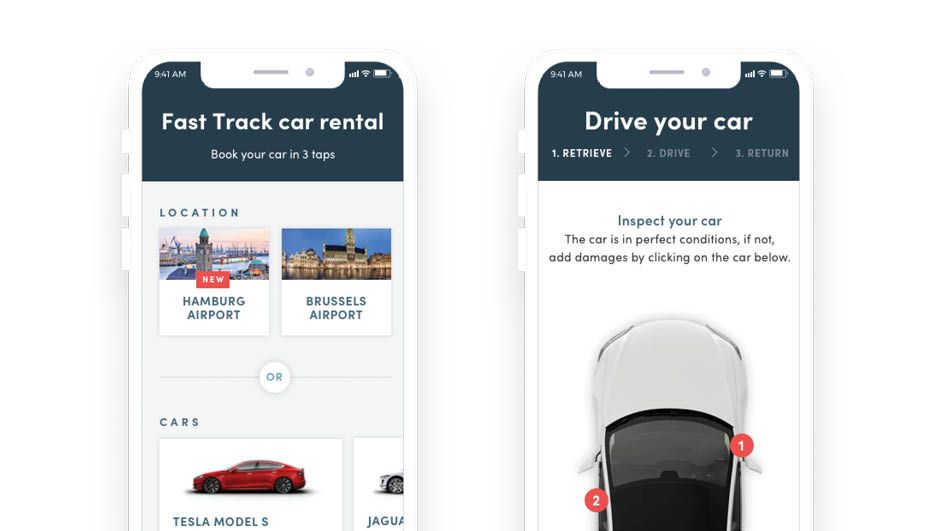
An automated rental car inspection typically follows five stages: capture the vehicle, validate image quality, detect and classify damage, create a condition report, and compare the vehicle’s condition at pickup and return. The following steps describe how a guided AI inspection workflow runs at pickup and at return.
At check-in (pickup)
- Guided capture initiated: The renter receives a capture link by SMS or through the rental app. A guided flow prompts them to photograph and film the vehicle from all required angles.
- AI quality check: Each submitted image is automatically validated for clarity, lighting, and coverage. Substandard images are rejected within seconds and the user is prompted to retake them.
- AI damage analysis: The AI model identifies all visible damage across the vehicle's exterior panels, glass, lights, and tyres. Each finding is classified by type, location, and severity.
- Baseline report generated: A timestamped condition report is produced, documenting the vehicle's state at the point of collection. This report is the reference baseline for the return inspection.
- Renter access: The renter can view the check-in report before driving away. This gives both parties a shared, documented record of the vehicle's condition at handover.
At check-out (return)
- Return capture: The same guided capture process is repeated at the point of return.
- Before-and-after comparison: The AI automatically compares the return condition against the pickup baseline. Components present in both reports are matched. The system flags any change in condition.
- New damage identification: Damage that was not present at pickup and is visible at return is specifically flagged in the output. The report shows before-and-after images for each flagged component.
- Human review of flagged cases: A rental agent reviews flagged damage before any charge is applied to the renter's account. The agent can confirm, adjust, or dismiss the flag based on the visual evidence.
- Dispute-ready output: If the renter challenges a charge, the timestamped before-and-after report is the reference point. Both parties are working from the same documented evidence.
Is an AI Rental Car Scanner the Same as a Guided Capture App?
No. These are two different hardware and deployment models, suited to different operational contexts.
Fixed-site scanners: These are permanent installations at a fixed location, typically a depot entry or exit lane. A vehicle drives through a scanning bay. Multiple cameras capture it automatically from all angles as it passes. No user input is required. This vehicle damage scanner is designed for very high-volume, fixed-site operations where vehicles pass through a controlled point.
Guided capture apps: This model uses a smartphone camera and a guided capture flow. The renter or agent photographs the vehicle following on-screen prompts. No physical installation is required. The capture can happen at any location. The AI processes the submitted media and generates the condition report.
Inspektlabs is a guided capture platform. The capture happens via smartphone. There is no fixed hardware to install. This makes the system deployable at any rental location, regardless of size or volume, and it means renters can complete their own check-in capture without an agent being present. For more detail on how the AI damage analysis works across all vehicle types and components, see AI-powered damage detection.
Both models have a place. Fixed scanners are well-suited to high-volume airport depots with the infrastructure to support a permanent installation. Guided capture apps are better suited to distributed rental locations, smaller operations, and scenarios where the renter completes the inspection themselves at pickup and return.
For Car Rental
Cut pre- and post-trip inspection time to seconds
Compare before-and-after condition automatically.
How Are Rental Damage Disputes Resolved Fairly?
Recent deployments of AI-based vehicle scanning by rental companies have highlighted an important question: how should AI-identified damage be communicated and reviewed before a renter is charged? Hertz reported to Forbes and CBS News that over 97% of scanned rentals showed no billable damage. According to reporting by Forbes, Hertz said that more than 97% of rentals scanned through its AI-based inspection system showed no billable damage. The figure illustrates an important point for rental inspection automation: the technology must not only detect damage accurately but also provide a transparent process for reviewing and communicating flagged damage. That figure reflects the reality: most rentals return undamaged. The concerns that emerged centred not on AI accuracy, but on process transparency, specifically whether renters were notified that scanning was in use, whether they could see their results, and whether a human agent reviewed damage flags before billing was applied automatically.
These lessons directly inform what good rental inspection automation looks like.
- Renter-visible results at check-in: The renter should be able to see the condition report before they drive away. This removes uncertainty about what was already recorded as pre-existing damage.
- Before-and-after evidence on flagged returns: When the return inspection flags new damage, the renter should receive before-and-after photos that show specifically what changed. Evidence presented to the renter is evidence that can also be disputed by the renter.
- Human review before any charge: A rental agent should review AI-flagged damage before a charge is applied. The AI identifies and documents. The human confirms. This is the point where context matters: pre-existing damage not captured in the check-in images, or lighting artefacts in photos, are things a human review can identify and address.
For a more detailed comparison of how AI inspection measures up against manual inspection on accuracy, consistency, and cost, see how AI compares to manual vehicle inspection.
The practical outcome of this process design is that disputes become shorter and less frequent. When both parties have access to the same timestamped visual record from pickup and return, the dispute conversation shifts from opinion to evidence.
What Should a Rental Vehicle Damage Inspection App Include?
Not all rental inspection apps are equivalent in what they produce. Here is what the output and workflow should cover.
- Guided capture with coverage prompts: The app should prompt the user through all required capture angles, not just accept an open-ended photo upload. Without guidance, users miss components, photograph from poor angles, or skip panels that later become disputed.
- Automated image quality validation: Blurred, underexposed, or incomplete images should be rejected before the assessment runs. The quality gate is what makes the resulting report reliable.
- Timestamped condition reports: Every report should include the date, time, and location of the capture.Timestamped records strengthen the evidence available when resolving damage disputes.
- Before-and-after comparison: The return report should automatically compare against the pickup baseline and highlight what changed. This should not require manual side-by-side review.
- Renter-visible results: The renter should be able to see their check-in report. Transparency at pickup removes the surprise at return.
- API integration: Inspection data should flow into the rental management system automatically. Manual data re-entry creates errors and adds administrative overhead.
What Are the Challenges of Implementing Inspection Automation?
AI rental inspection solves real operational problems. It also introduces new constraints that are worth understanding before deployment.
Image quality dependency: The AI assessment is only as good as the submitted media. Poor lighting, rain on the vehicle, or photographs taken from the wrong angle all reduce accuracy. Guided capture and quality validation reduce this risk, but they do not remove it entirely.
System integration complexity: Connecting an inspection app to an existing rental management system via API requires technical work. The integration needs to be set up correctly for inspection data to flow into the right workflows.
User adoption at the renter level: When renters complete their own check-in capture, the quality of the submission depends on how clearly they follow the guided flow. Some renters will rush through it. Others will submit every possible angle with care. The guided flow narrows this gap, but it does not eliminate it.
Edge cases in damage detection: The AI achieves 90 to 95% accuracy across visible damage types. Cases that fall outside this range include damage in very low-contrast conditions (dark cars in low light), very minor scuffs at the edge of detection thresholds, and unusual damage patterns that are underrepresented in training data. Human review of flagged cases catches most of these.
Change management: Agents accustomed to manual walkarounds need to understand why the new process works and what their role is within it. The technology does not replace agent judgment; it gives agents better evidence to work with.
How Much Does Car Rental Inspection Automation Cost?
The cost of automating rental car inspections depends on factors such as inspection volume, number of locations, capture method, required integrations, and the level of AI analysis required.
A smartphone-based inspection workflow can avoid the upfront infrastructure costs associated with fixed-site vehicle scanners, while API integration and enterprise deployment requirements can affect the overall implementation cost.
Rental companies evaluating inspection software should compare the total cost of ownership against the operational costs of manual inspections, including inspection time, staffing, damage disputes, administrative work, and vehicle turnaround delays.
For an accurate estimate, rental companies should request pricing based on their fleet size, inspection volume, locations, and integration requirements.
How Does Automated Rental Inspection Improve ROI?
The ROI of rental inspection automation comes from reducing the time and manual effort required to inspect vehicles while improving the quality of condition records.
Rental companies can evaluate ROI using five operational metrics:
1. Inspection time per vehicle
2. Vehicles inspected per employee
3. Vehicle turnaround time
4. Number and cost of damage disputes
5. Administrative time spent reviewing inspection records
For example, if automation reduces inspection time per vehicle and allows vehicles to return to the rental fleet faster, the same fleet can potentially support more rentals without a proportional increase in inspection resources.
How Do You Choose the Right Car Rental Inspection Software?
The following checklist covers the factors that distinguish effective car rental inspection software from a basic photo-upload tool.
- AI accuracy: Can the software detect damage across all standard vehicle components to a documented accuracy level? Ask for benchmark figures specific to the rental use case, not just a general claim.
- Capture methods supported: Does the software support guided smartphone capture, fixed camera integration, or both? Match the deployment model to your operational setup.
- Before-and-after comparison: Is the comparison automatic, or does it require manual review? Automatic comparison is what makes the workflow scalable.
- Report depth and format: Does the report document damage type, location, severity, and estimated repair cost? Can it be shared with the renter directly? Is it exportable for integration with claims workflows?
- Renter transparency features: Can renters view their own check-in results? Is there a self-service dispute submission channel? These features affect both trust and dispute frequency.
- API integration: Does the software offer a documented API that connects to standard rental management platforms? Integration quality determines whether the inspection data is actually usable downstream.
- Scalability: Can the software handle your current inspection volume without degradation in report quality or turnaround time? Can it scale as your fleet grows?
Where Does Inspection Data Go After Check-Out?
The condition record created at pickup and return does not just resolve the current rental. It builds a documented history for every vehicle in the fleet.
Each inspection adds a timestamped data point to that vehicle's condition record. Over time, this data reveals which vehicles are accumulating incremental damage, which components are showing wear patterns, and which vehicles are approaching the point where repair costs outweigh the vehicle's residual value.
This condition history feeds directly into maintenance planning, replacement decisions, and resale preparation. For how inspection data supports longer-term fleet lifecycle decisions, see fleet vehicle lifecycle management.
Who Benefits Most From Automated Rental Car Inspections?
- Airport rental companies: Handle high volumes of vehicle check-ins and returns faster.
- Multi-location rental companies: Keep inspection processes consistent across branches.
- Fleet operators: Monitor vehicle condition and track new damage over time.
- Car-sharing companies: Let customers complete inspections between trips.
- Vehicle subscription fleets: Record vehicle condition at each customer handover.
- Smaller rental businesses: Reduce manual inspection work with smartphone-based AI.
Key Takeaways
- Rental car inspection automation replaces manual walkarounds with guided smartphone capture, AI damage analysis, and automated before-and-after comparison.
- The check-in inspection creates a timestamped baseline. The check-out inspection compares against it and flags any new damage for human review before any charge is applied.
- AI rental car scanners (fixed hardware in a depot bay) and guided capture apps (smartphone-based) are different models suited to different operational contexts. Inspektlabs uses guided capture.
- AI inspection achieves 90 to 95% accuracy on visible damage. Image quality, edge cases, and change management remain real implementation challenges.
- Condition data from each inspection builds a vehicle history that supports maintenance planning, lifecycle decisions, and resale preparation.
Damage disputes are the most common friction point in the rental experience. They happen because both parties are working from different recollections of the vehicle's condition at pickup and return. Inspection automation removes that ambiguity by creating a documented, timestamped, visual record at both points.
The value is not just in catching damage. It is in building a process where the evidence is available before the conversation starts. Renters who can see their check-in results before driving away, and who receive before-and-after photos when damage is flagged, are in a fundamentally different position than renters who receive an unexpected charge and no visual evidence to review.
Frequently Asked Questions
What is AI rental car inspection?
AI rental car inspection uses guided photo and video capture and automated analysis to document vehicle condition at pickup and return. The AI identifies damage, classifies it by type and severity, and generates a timestamped before-and-after comparison report automatically.
Is an AI rental car scanner the same as mobile inspections?
No. A fixed-site scanner uses permanent camera hardware installed at a depot entry or exit point. A guided capture app uses a smartphone and an AI model. Both produce condition reports, but the deployment model, infrastructure requirements, and operational context differ.
How are damage disputes resolved with AI rental inspections?
When return inspection flags new damage, the renter receives before-and-after images showing what specifically changed. A human agent reviews the flag before any charge is applied. The timestamped report serves as the reference point for any dispute, giving both parties documented visual evidence rather than competing recollections.
Do rental companies always charge for AI-flagged images?
Effective rental inspection workflows include human review of AI-flagged damage before any charge is applied. The AI identifies and documents. The agent confirms, adjusts, or dismisses the flag. Billing without human review is where the risk of incorrect charges arises.
What should a rental vehicle damage inspection app include?
Guided capture prompts, automated image quality validation, timestamped reports, automatic before-and-after comparison, renter-visible check-in results, and API integration with rental management systems. These features together make the output operationally usable and renter-trustworthy.
Can renters see their own inspection results?
In a well-designed rental inspection workflow, yes. The check-in report should be accessible to the renter before they drive away. This transparency removes uncertainty about what was pre-recorded and provides a clear baseline both parties can reference.
Can customers perform their own rental inspections?
Yes, with guided capture. The renter follows a prompted sequence of photos and video using the app. The guided flow covers all required angles. Quality validation ensures the submission meets the standard before the AI assessment runs.
What devices are needed for automated rental inspections?
For guided capture apps like Inspektlabs, a modern smartphone with a camera and internet access is all that is required. No additional hardware is needed. Fixed-site scanners require dedicated camera hardware and permanent installation at a specific location.
What is the best AI inspection solution for rental check-in and check-out?
The best solution combines guided capture, automatic quality validation, 90 to 95% damage detection accuracy, timestamped before-and-after comparison, renter-visible results, human review of flagged cases before billing, and API integration with rental management systems. Inspektlabs covers all of these in a smartphone-based platform deployed across rental operations in the EU, Middle East, and APAC.